Time Management

20/20 – Day 13: 20 ways to cut down & free up time

You’re busy, so I’ll keep it brief. Here’s how you can start saving even more time.

  1. No unplanned events. Impromptu is a no-no.
  2. Ignore TV.  As Gary Vaynerchuk says, “Everybody has time, stop watching f__king Lost”
  3. Switch off IM services.
  4. Switch off Facebook, Twitter, et al.
  5. Filter out all unnecessary plans/tasks.
  6. Quit something.  Do less and win.
  7. Order in Most Important Tasks (MIT).
  8. Don’t let unfinished tasks bog you down. Finish them, or get rid of them completely if unimportant.
  9. Declutter. Mess doesn’t work for everyone.  If it bothers you, get rid of it, make some quick fixes, or change your system.
  10. Do not be disturbed. No exceptions.  Switch yourself off from the world.
  11. Stop using so much toothpaste. Your time, according to Sid Savara, is like a tube of toothpaste.  Savara says:
    “Unlike a stream running or sand falling in an hourglass, toothpaste does not simply come out of a tube on its own – we force it out and use it up. Similarly, we are not spectators in our own lives with our days, weeks and months passing us by. Each day we make a decision what to do and what not to do. Every moment is our opportunity, but it’s a moment that we must choose to use up.”
  12. Plan a leaving time every time you go out. Stick to it.
  13. Be strict. Time is precious. Treat it that way.
  14. Don’t schedule and forget about it.  To make proper use of a timetable or schedule, check it in the evening and at the start of the day.
  15. Incorporate unexpected events as soon as possible. Make appropriate changes to your schedule right away.
  16. Complete overlapping tasks together in order to avoid doing the same preparation two or three times.  Batch those tasks!
  17. Read my six-part series, “Make Time for Time“.
  18. Check times saps like social services and email just once or twice a day.
  19. Delegate, if possible and appropriate.  Not a typical student option, but don’t rule it out.  There will be occasions.
  20. Keep on top of routine tasks.  It’s quicker and easier as you go along.
Title image: original by tiffa130 (cc)

20/20 – Day 5: 20 uses for 20 minutes

Pushed for time?  Got some spare time?  Don’t want to waste time?

Whatever the case, 20 minutes isn’t very long. But it’s long enough to do all sorts of things.  Day 5 of 20/20 explores some of the things you can do in a seemingly small space of time.

  1. Wash your clothes. Gather up a load of washing, stick it in the machine, throw in the detergent, and you’re away.  Even if you have to walk to the laundrette, it shouldn’t take you more than 20 minutes to get this done.  And if you want to wait for the load to finish, it’ll give you more time to do some more of the stuff below.
  2. Wash the dishes. One of the jobs we love to hate.  You don’t really see dishwashers in student digs, so the washing up has to be done at some point.  Get it out of the way when you’ve got time to spare.  When it’s done, it’s out of the way.  Now all you need to do is never eat or drink again…
  3. Have a shower. You’ll be clean, you’ll be refreshed, you’ll be stimulated. Not bad for 20 minutes work.
  4. Start writing an annoying essay. Time yourself and see what you write. It’s just a way to ease you in. When it works, it’s awesome. And it works more than you think it might.
  5. Read.  If you need an excuse…
  6. Power nap. A quick rest to give you more energy for the rest of the day. What’s not to like?
  7. Walk somewhere nearby.  10 minutes each way, but make it 20 minutes each way if feeling adventurous. Get your mind working, enjoy the view, think about stuff or ignore everything. Up to you. A walk brings many benefits and it’s healthy too.
  8. Send a postcard. It’s a great way to keep in touch with people you care about.  It doesn’t take long and it’s a novel way to make someone smile.
  9. Make a phone call. Not just any call. Ring someone who’ll really appreciate the fact that you’ve taken the time to make contact.
  10. Watch educational videos online.  Get a short burst of mental stimulation.
  11. Write something different. A short poem, a manifesto, a journal entry.  Make your mark in a way you wouldn’t usually consider.
  12. Make a list of the things you want to do before you graduate. To get an idea, check Savvy Student’s suggestions.
  13. Make a social media splash. Not just chatting on Facebook. Start a professional profile, follow influential people on Twitter, get a blog started, if you’ve already got a blog then write a post for it.
  14. Work on your CV. Never too early to make it shine.
  15. Tidy up. There’s never enough time for stuff like clearing your room. There is if you only spend 20 minutes on it.  You won’t finish, but it’s better than doing no tidying at all!
  16. Take stock.  20 minutes is all you need to see how far you’ve come and note what you need to do going forward.  It’s actioning those plans that takes the time.
  17. Write a list. Who knows where it will take you?
  18. Listen to a genre of music you’re not used to. Experience the new. If you don’t like it, you’ve not wasted much time. If you do like it, you’ve got so much more goodness to explore.
  19. Do something different. However big or small, change your perspective and do something you’ve never done before. Or do something old in a completely different way. Do it just to see how you react. Obviously don’t do anything dangerous. I’m saying do something different, not stupid.
  20. Just stop. Celebrate silence. A few moments of pure nothing is wonderful in a world where we’re always doing something.  You’re allowed to have a breather.

Title image: original by tiffa130 (cc)  /  Bottom image: Robbert van der Steeg (cc)

Order Plus Focus Equals WIN!

When you see the list of things to do getting longer and out of control, take action.

Here’s a quick way to get back on track:

Order in importance and focus on just a few tasks each day.  Anything else is a bonus.

I’m sure you don’t have 20 tasks that all need finishing TODAY, even if that’s how it feels sometimes.  Let’s say time truly is tight and you have a week to get 20 important things complete.  That’s less than three things you need to do each day that week.  Even if you relax at weekends, you’d only have four tasks to do each weekday before completing all 20.

I’m sure the jobs will take different lengths of time, but this doesn’t when your list is out of control.  Every job will seem to take up too much of your valuable time.  In the circumstances, you need to claw things back and be the master of it once more.

Do this:

  • List all the stuff you need to do.
  • Make sure you really NEED to do it.  Anything not important or urgent, take off the list.
  • Arrange items in order of importance. But,
  • Anything that requires urgent attention over the next day should come first. And,
  • Shorter tasks that are inconvenient to complete, but won’t take long, can be dealt with as soon as possible too. That’ll take them off the list and give you a warm, fuzzy feeling.
  • Everything else follows on the list, still in order of importance.

If you won’t feel any more warm and fuzzy just by removing the shorter tasks off the list quickly, it may be best to skip that step.  Just order in importance and don’t focus on anything else until you’re out of danger and able to relax once more.

This is a quick and dirty method that still requires a push on your own part, but it helps get the job done.  With a tight focus, you shouldn’t feel so overwhelmed, especially when you get closer to clearing the list of tasks.

I wouldn’t recommend this as a regular way to deal with your time!  The exercise is simply to get you over a panic.

May you never need to use such a method. 😉

Speedy Spoken Word

The spoken word.  Talk shows, podcasts, audio reports.  Do you bother, or are you happy to stick with reading?  After all, you can read a transcript of a speech more quickly than listening to it.  So what’s the point?

For one thing, we learn through more than our eyes.  Ears aren’t just for TV, music and hearing your own voice.

But we don’t like hanging around.  Listening to the spoken word can seem unbearably slow at times.  I try to get round that by listening at high speed.  When I do, it saves time AND helps me concentrate better.  It’s a win/win situation for my ears and my mind.

Say you want to listen to one of the many useful podcasts out there.  A transcript would likely allow someone to read through in about 10 minutes.  But you take information in differently when reading. By listening, you have a different relationship with the material.  It’s wise to vary your information intake.  You may even find that you’re more inclined to learn through audio, rather than text on a page.

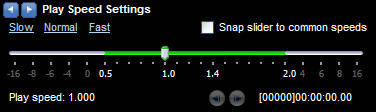
A better way to improve the process is to speed up the audio.  The easiest way to increase the speed without installing extra software on a Windows PC is through Windows Media Player.  The Media Player has a helpful enhancement called “Play Speed Settings“.  A slider allows you to speed up and slow down the audio that’s playing.

Go through the following menu option: View / Enhancements / Play Speed Settings

When you select this, you’ll see a new menu box appear at the bottom of the Media Player window, with the slide bar.

An option to “Snap slider to common speeds” will restrict you to playing audio at particular points (such as 1.4x and 2.0x).  I tend not to have the box ticked, so I can use the slider however I want to.  I generally crank the slider up anywhere around 1.4-1.7 times the speed.

While the playback speeds up, the pitch is remains the same, so faster audio doesn’t result in listening to chipmunks.

A 30 minute podcast, at 1.4-1.7x speed, will last around 17-22 minutes.  Not a bad time saving. Even better if it manages to improve comprehension…

At these speeds, I retain more detail.  I no longer notice long gaps and pauses in talking.  My mind is less likely to wander off into other thoughts.  My focus stays given the more urgent pace.  It doesn’t take a moment for you to forget you’re listening to quicker voices.  In fact, slow the playback down again and the audio sounds uncomfortably slow!

I suggest you start listening at a slightly faster pace and gradually increase it as you go along.  I rarely go beyond 1.7x speed, but some people increase it to more than two times the regular speed.  There will come a point when you compromise intake of information, so be careful how fast you go.

You can change the speed via the keyboard too, if you wish:

  • Speed up sound: Ctrl-Shift-G
  • Return to original speed: Ctrl-Shift-N

At the right speed, audio can be a grand thing.  Happy listening!