productivity

Order Plus Focus Equals WIN!

When you see the list of things to do getting longer and out of control, take action.

Here’s a quick way to get back on track:

Order in importance and focus on just a few tasks each day.  Anything else is a bonus.

I’m sure you don’t have 20 tasks that all need finishing TODAY, even if that’s how it feels sometimes.  Let’s say time truly is tight and you have a week to get 20 important things complete.  That’s less than three things you need to do each day that week.  Even if you relax at weekends, you’d only have four tasks to do each weekday before completing all 20.

I’m sure the jobs will take different lengths of time, but this doesn’t when your list is out of control.  Every job will seem to take up too much of your valuable time.  In the circumstances, you need to claw things back and be the master of it once more.

Do this:

  • List all the stuff you need to do.
  • Make sure you really NEED to do it.  Anything not important or urgent, take off the list.
  • Arrange items in order of importance. But,
  • Anything that requires urgent attention over the next day should come first. And,
  • Shorter tasks that are inconvenient to complete, but won’t take long, can be dealt with as soon as possible too. That’ll take them off the list and give you a warm, fuzzy feeling.
  • Everything else follows on the list, still in order of importance.

If you won’t feel any more warm and fuzzy just by removing the shorter tasks off the list quickly, it may be best to skip that step.  Just order in importance and don’t focus on anything else until you’re out of danger and able to relax once more.

This is a quick and dirty method that still requires a push on your own part, but it helps get the job done.  With a tight focus, you shouldn’t feel so overwhelmed, especially when you get closer to clearing the list of tasks.

I wouldn’t recommend this as a regular way to deal with your time!  The exercise is simply to get you over a panic.

May you never need to use such a method. 😉

Speedy Spoken Word

The spoken word.  Talk shows, podcasts, audio reports.  Do you bother, or are you happy to stick with reading?  After all, you can read a transcript of a speech more quickly than listening to it.  So what’s the point?

For one thing, we learn through more than our eyes.  Ears aren’t just for TV, music and hearing your own voice.

But we don’t like hanging around.  Listening to the spoken word can seem unbearably slow at times.  I try to get round that by listening at high speed.  When I do, it saves time AND helps me concentrate better.  It’s a win/win situation for my ears and my mind.

Say you want to listen to one of the many useful podcasts out there.  A transcript would likely allow someone to read through in about 10 minutes.  But you take information in differently when reading. By listening, you have a different relationship with the material.  It’s wise to vary your information intake.  You may even find that you’re more inclined to learn through audio, rather than text on a page.

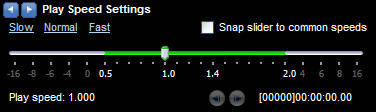
A better way to improve the process is to speed up the audio.  The easiest way to increase the speed without installing extra software on a Windows PC is through Windows Media Player.  The Media Player has a helpful enhancement called “Play Speed Settings“.  A slider allows you to speed up and slow down the audio that’s playing.

Go through the following menu option: View / Enhancements / Play Speed Settings

When you select this, you’ll see a new menu box appear at the bottom of the Media Player window, with the slide bar.

An option to “Snap slider to common speeds” will restrict you to playing audio at particular points (such as 1.4x and 2.0x).  I tend not to have the box ticked, so I can use the slider however I want to.  I generally crank the slider up anywhere around 1.4-1.7 times the speed.

While the playback speeds up, the pitch is remains the same, so faster audio doesn’t result in listening to chipmunks.

A 30 minute podcast, at 1.4-1.7x speed, will last around 17-22 minutes.  Not a bad time saving. Even better if it manages to improve comprehension…

At these speeds, I retain more detail.  I no longer notice long gaps and pauses in talking.  My mind is less likely to wander off into other thoughts.  My focus stays given the more urgent pace.  It doesn’t take a moment for you to forget you’re listening to quicker voices.  In fact, slow the playback down again and the audio sounds uncomfortably slow!

I suggest you start listening at a slightly faster pace and gradually increase it as you go along.  I rarely go beyond 1.7x speed, but some people increase it to more than two times the regular speed.  There will come a point when you compromise intake of information, so be careful how fast you go.

You can change the speed via the keyboard too, if you wish:

  • Speed up sound: Ctrl-Shift-G
  • Return to original speed: Ctrl-Shift-N

At the right speed, audio can be a grand thing.  Happy listening!

26 Sharp Essay Tips

Essays.  You can’t get away from them.  And even if you’re up for the challenge, that doesn’t make the writing process less stressful.

Whatever happens in a single essay, don’t be distracted or downhearted.  I remember handing in an essay that I was proud of, yet it barely scraped a pass.  I was gutted.  In the same semester, I couldn’t get my head round a particular essay and handed in what I thought was mediocre work…but my tutor didn’t see it that way and gave me an amazing grade.

No wonder the essay experience is a stressful one!

While I can’t take away that stress, I do have 26 tips below to reduce some of the uncertainty.  They’ll point you in the right direction when it comes to making the grade.  It’s not exhaustive, but when it comes to essays, nothing is!  If you have any killer tips that you can’t live without, let us know.  We like advice.  Advice is good!

(more…)

Make Time For Time: 6. Find time to create your perfect study setup

Welcome to the final part of the “Make Time For Time” series of posts.

It’s not always possible to get a lot of help from study advice.  There’s no magic answer, because everyone works differently.  Making time for time involves finding your way.  That, in itself, does take some time.  Allow yourself different trials in your quest to find the perfect study setup, otherwise you may never find what works for you.

photo by m00by

photo by m00by

Some trials to consider:

  • Place of study – Are you better off at your personal desk, at the library, in an outside space?  Location is an important factor in effective work.  Everything else may be right, but if the space doesn’t feel right, it’s hard to work well.
  • Belongings – This is an extension of your study space.  If you’re working in a field in the middle of nowhere, you won’t have much to think about.  A desk in your own room, however, is a different matter. You’ll have loads of distractions in front of you and there may be a messy desk cramping your style.  You may work wonderfully in your current location, but the stuff around you can get in the way instead, without you realising.  If you have an ‘off’ day, check the junk and distractions putting you off and get them out of your sight.
  • Time of day – Night owl or morning lark?  The time of day you do your work makes a huge difference. What works best for you?
  • Your general health – Do you have a 30 minute study session planned just before you eat dinner?  If you’re already hungry, it’s probably a bad time to start working.  Get the food out of the way before you start working the brain.  And what about exercising physically before you exercise mentally?  A quick walk can do wonders for the mind.  Just a 10 minute walk about campus, or around your local area can be enough to give you a jolt in the right direction.  You may even get some ideas on the walk.  Carry a notepad and pen…just in case!
  • Headbanger, or silent wonder? – Music helps some of us and hinders others.  Even the type of music can make a difference.  I’ve known some people who don’t like classical music who swear by it when they study.  They don’t even notice the music, but it helps them zone out.  So think about the sounds around you and use music wisely to work effectively.  Try listening to different random white/pink/brown noise if you like, or choose a soundscape with birds and rainfall, or just listen to your favourite song.  There’s bound to be something out there to get you in the mood, even if it’s total silence. Earplugs, here we come!

photo by svenwerk

photo by svenwerk

From this series of articles, I hope it’s clear that time is something you have a lot of control over.  It may not feel that way much of the time, but there really is a lot we can do to manage time more effectively.

Even the most brilliant planners don’t have a perfect time-management technique.  Lives change, as do priorities.  I called this series ‘Make Time For Time’, because we should never stop thinking about the time available to us.  The moment you drop your guard and think you can’t manage your time any better is the moment you’ll slip up.

In my early teens I was awful at time-management.  It was only after my A-Levels, just before I went to uni, that I realised how much better I could do.

I went from being rubbish at time-management to being okay.  Yes, just okay.  Because it’s hard to be better than okay.  I’m happy to call my time-management a strength, just so long as I’m clear to myself that the real strength is to have a constant awareness that my time can always be managed better and that I will always strive to improve.

If that sounds like your attitude towards time-management, you should be happy to call it a strength too.